How to run the frequency test
- Set your normal listening volume. Don’t raise it during the test. Turning up the volume to chase a tone at the edge of your range makes the result meaningless and can damage your speakers or ears.
- Find your lowest frequency. Press Start. A tone sweeps down from 250 Hz. Press I can’t hear it anymore as soon as it disappears.
- Find your highest frequency. A tone sweeps up from 8 kHz. Again, press the button when it disappears.
- Read your result. You get your range, for example “28 Hz – 16.2 kHz”, with an explanation of what limits each end.
The tool subtracts a typical reaction time from each press, so the recorded frequency is close to where the tone actually faded. Repeat the test a couple of times. Results within 10% of each other are consistent.
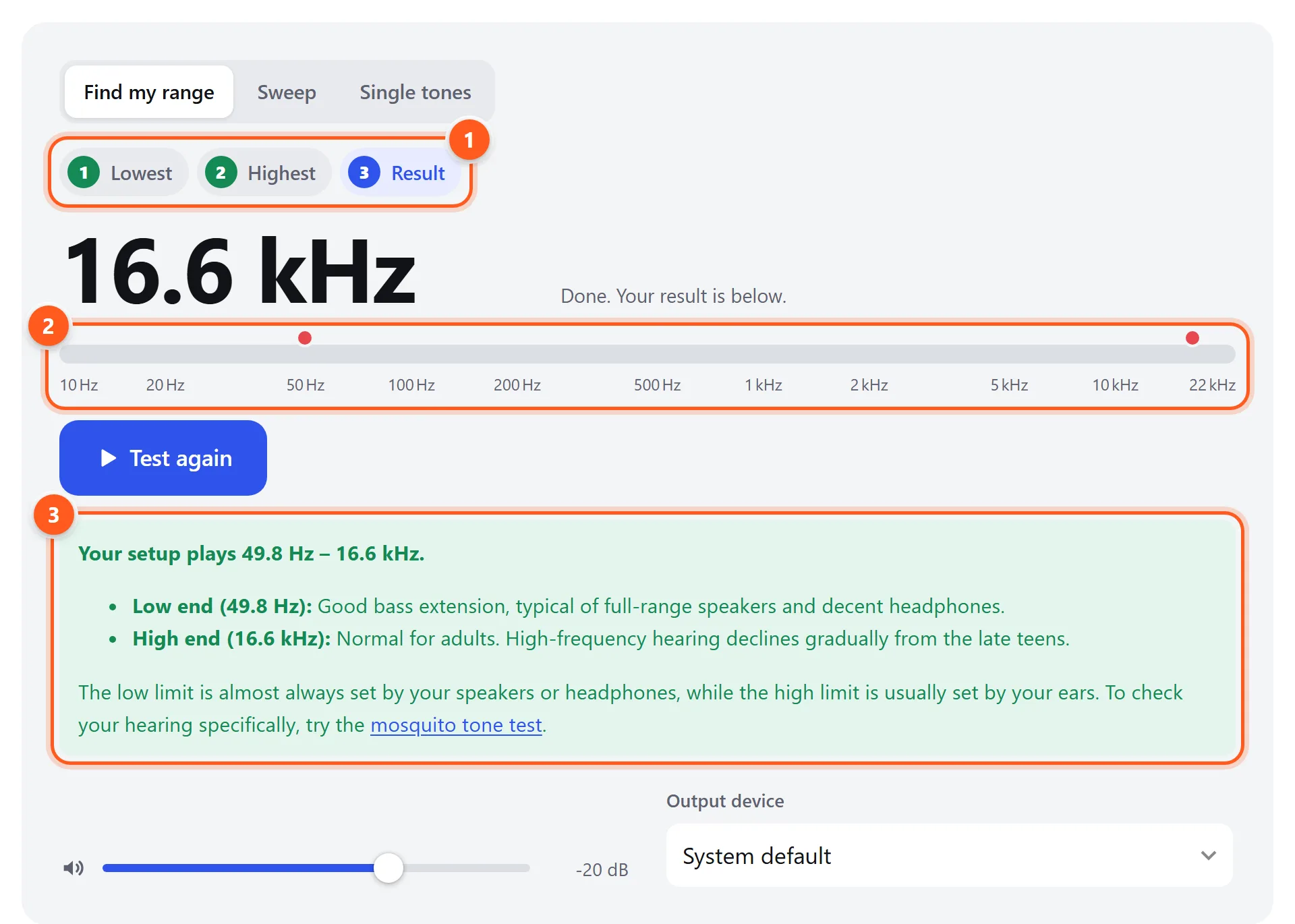
- Progress: lowest frequency, highest frequency, then the result.
- The two red dots mark your measured limits on a 10 Hz – 22 kHz scale.
- Your range and what it means. The low end is usually limited by the speakers, the high end by your ears.
The Sweep tab plays a continuous tone from 20 Hz to 20 kHz (or just the bass or the highs) at the speed you choose, on the left, right or both channels. The Single tones tab plays fixed frequencies, from 20 Hz to 20 kHz, which is handy for checking one frequency at a time or comparing devices.
The audible frequency range
Click to hear a sample of each band. They play at the same level, so you’ll notice how much less sensitive your ears are at the extremes.
| Band | Range | What lives there | Listen |
|---|---|---|---|
| Sub-bass | 20–60 Hz | Felt more than heard: pipe organ, kick drum thump, movie explosions | |
| Bass | 60–250 Hz | Bass guitar, the body of drums, the fundamental of male voices | |
| Low mids | 250–500 Hz | Warmth of instruments; too much sounds “muddy” | |
| Midrange | 500 Hz–2 kHz | Most of the voice and melody; telephones carry roughly 300 Hz–3.4 kHz | |
| Upper mids | 2–4 kHz | Where hearing is most sensitive; speech clarity, consonants | |
| Presence | 4–6 kHz | Definition and closeness; too much sounds harsh | |
| Brilliance / air | 6–20 kHz | Cymbals, “s” sounds, sparkle and space |
What limits your result
Your speakers or headphones
Reproducing deep bass takes a large driver that moves a lot of air, so the low end of your result mostly reflects your speakers. Typical lower limits (the point where the bass becomes inaudible at normal volume):
| Device | Typical lowest audible frequency |
|---|---|
| Phone speaker | 200–400 Hz |
| Laptop speakers | 120–250 Hz |
| Small desktop or Bluetooth speaker | 60–120 Hz |
| Bookshelf speakers | 40–60 Hz |
| Floor-standing speakers | 30–45 Hz |
| Subwoofer | 18–30 Hz |
| Headphones and earbuds with a good seal | 10–30 Hz |
If earbuds give a poor low-end result, the seal is usually the problem. Try a larger ear tip and run the bass check in the headphone test.
Bluetooth and the sample rate
Digital audio can only contain frequencies up to half its sample rate: 22.05 kHz at 44.1 kHz, and 24 kHz at 48 kHz. Bluetooth codecs go further and often discard everything above 15–17 kHz to save bandwidth. If your high limit is exactly the same on every pair of Bluetooth headphones but higher on wired ones, that’s the codec, not your ears.
Your age and hearing
The high end of your result is usually set by your ears. Sensitivity to high frequencies declines steadily from the late teens (a process called presbycusis), and faster with noise exposure. Rough averages for the highest tone people can hear at moderate volume:
| Age | Typical upper limit |
|---|---|
| Under 20 | 17–20 kHz |
| 20–29 | 16–17 kHz |
| 30–39 | 15–16 kHz |
| 40–49 | 13–15 kHz |
| 50–59 | 11–13 kHz |
| 60 and over | 8–11 kHz |
Individual results vary a lot. A lower-than-average high limit on its own isn’t a diagnosis. Speech depends mostly on 250 Hz–8 kHz, which is what the hearing test checks for each ear.
Device limit or hearing limit?
- Swap the device. Run the test on good wired headphones and on your speakers. If the high limit changes, the device was limiting it. If it stays the same, it’s your hearing.
- Swap the person. Ask someone younger to try the same setup. If they hear higher, your setup is fine.
- Test each ear. In the Sweep tab, set the channel to L, then R. A big difference between your ears is worth mentioning to a doctor.
Using the sweep to find speaker problems
A frequency sweep is also a quick health check for speakers. As the tone rises, listen for buzzing or rattling at particular frequencies (a loose part, see the speaker test), a sudden drop in level (a dead tweeter or crossover fault), or a rough, distorted sound (an overdriven or damaged driver). Use Mark frequency to note where problems occur, then hold that frequency in the Single tones tab while you investigate.