How to get the right file
- Set the format to match what you’re testing. 48 kHz and 24-bit are right for most computers and audio interfaces. Use 44.1 kHz and 16-bit for CD players, older car stereos and USB sticks.
- Choose a length and tone level. The level applies to tones, sweeps and the left/right signal. The calibration tones and noise files have fixed, standard levels, shown on each row.
- Preview with the play button, at a comfortable preview volume.
- Download the WAV. The file name records exactly what’s inside, for example
soundtester_1kHz_-20dBFS_48k_24bit_10s.wav.
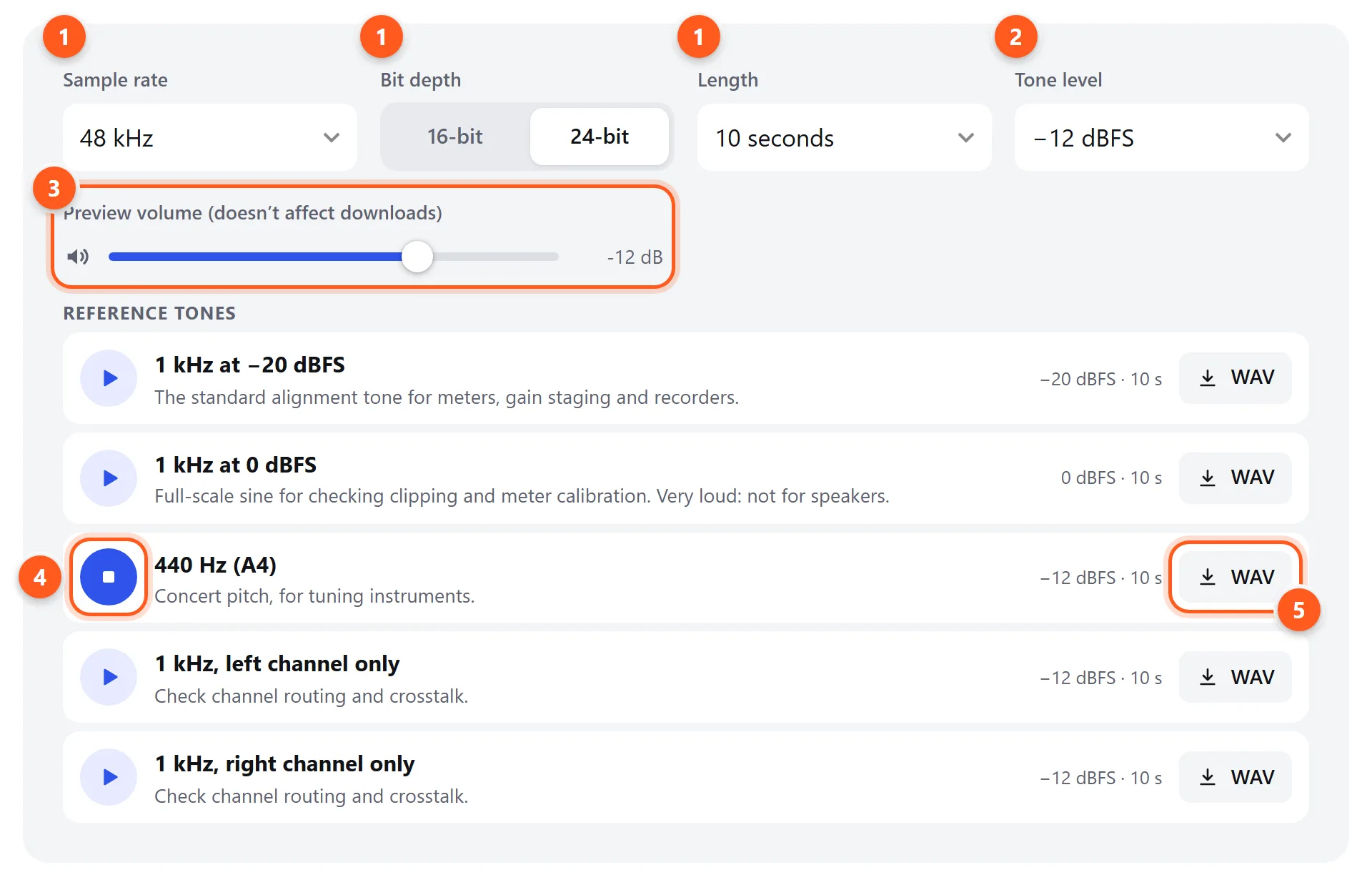
- Sample rate, bit depth and length. These apply to every download.
- Level for tones and sweeps (calibration and noise files keep their standard level).
- Preview volume only affects what you hear here, not the file.
- Preview a signal.
- Download as WAV. The level and length of each file are shown next to the button.
What each test file is for
1 kHz at −20 dBFS: the alignment tone
This is the reference tone used throughout broadcast and recording. Play it through a mixer, interface or recorder and set the input so the meter reads −20 dBFS (or 0 VU / +4 dBu on analog gear). That gives the standard 20 dB of headroom, and every stage of your signal chain is then lined up to the same reference. It’s also the tone to use when checking that a recorder or meter reads correctly.
1 kHz at 0 dBFS: the full-scale tone
The loudest clean sine a digital file can contain. Use it to check a meter’s full-scale reading or to find where a DAC or interface starts to clip. Don’t play it through speakers at normal volume: it’s 20 dB louder than the alignment tone.
Single-frequency tones
Steady tones from 20 Hz to 20 kHz let you check a specific part of the range: does the subwoofer reproduce 20 Hz? Is 50 or 60 Hz hum in a recording the same pitch as the mains? Can you (or your tweeter) still produce 15 kHz? For interactive control over any frequency, use the tone generator.
Sine sweeps
A logarithmic sweep spends equal time in every octave, so it sounds even from bottom to top. Play the 20 Hz – 20 kHz sweep and listen for frequencies that drop out, jump in level, or make something buzz. The 20–200 Hz sweep is the quickest way to find what rattles in a car or room, and where your subwoofer gives out. Measurement software can also use the sweeps as a stimulus. For a guided version with a live frequency readout, use the frequency test.
Pink and white noise
Pink noise at −20 dBFS RMS is the standard signal for setting speaker levels. Play it through each speaker in turn and adjust until a sound level meter reads the same for each (typically 75–85 dB C-weighted at the listening position). The stereo file has independent noise in each channel. The mono file has identical channels, so it should form a sharp image exactly between two speakers. If that image sounds vague or seems to come from everywhere, check the polarity. White noise has a flat spectrum, which makes it the usual input for testing electronics and measuring frequency response.
Left/right identification
Beeps alternate between the left and right channels, which is useful when you can’t use this website on the device under test: a car stereo, a TV, a USB stick in a hi-fi, or a long cable run. Each beep should come only from its own side. To test interactively, use the sound test.
Polarity pulse
Short, positive-going pulses. An acoustic polarity checker (a small handheld device with a microphone) shows a green or red light for each speaker, telling you whether its cone moves outward on a positive signal. Without a checker, use the listening method in our polarity test.
Silence (digital black)
Every sample is exactly zero, with no dither. Use it to measure the noise floor of a playback chain (anything you hear is the device’s own hiss or hum), to check that an amplifier isn’t humming, or as a gap between test tracks on a disc.
dBFS, levels and safety
The levels here are digital. How loud a file sounds depends entirely on your volume setting. A few rules keep your ears and equipment safe:
- Start with the volume low and raise it while the signal plays.
- High-frequency tones (10–20 kHz) can damage tweeters at high volume, even when you can’t hear them. Never turn up the volume to “find” a tone you can’t hear.
- Low-frequency tones and sweeps can push woofers past their safe excursion. If you hear distortion, flapping or knocking, turn down immediately.
- Steady tones are more fatiguing than music. Take breaks.
Getting reliable results
- Turn off audio enhancements on the device you’re testing: Windows sound enhancements, loudness, Dolby, “bass boost”, spatial audio and EQs all change test signals.
- Avoid lossy conversion. Bluetooth (especially SBC), streaming apps and MP3 conversion can cut high frequencies and alter noise. Play WAVs over a wired connection when accuracy matters.
- Match the sample rate to the device’s native rate so the operating system doesn’t resample the file.
- Disable volume normalization in media players (Sound Check, ReplayGain, Spotify normalization), which would change the levels.