How to test your headphones
- Start quiet. Headphones put sound right into your ears. Set your system volume to about 25% and raise it only if needed.
- Left/Right: click each button. If “Left” is in your right ear, you’re wearing them backwards or the wiring is reversed.
- Driver match: listen to the tone hop between your ears and choose which side sounds louder at each of the 10 steps. You get a summary at the end.
- 3D: the sound should circle around your head. Click a spot on the circle to place it there.
- Range: sweep the bass and the treble. Press Mark where you start or stop hearing the tone.
- Bass & seal (earbuds and in-ears): play the bass loop and gently press the earbuds in. Big bass changes mean a poor seal.
- Polarity: A should sound centered, B wide and vague.
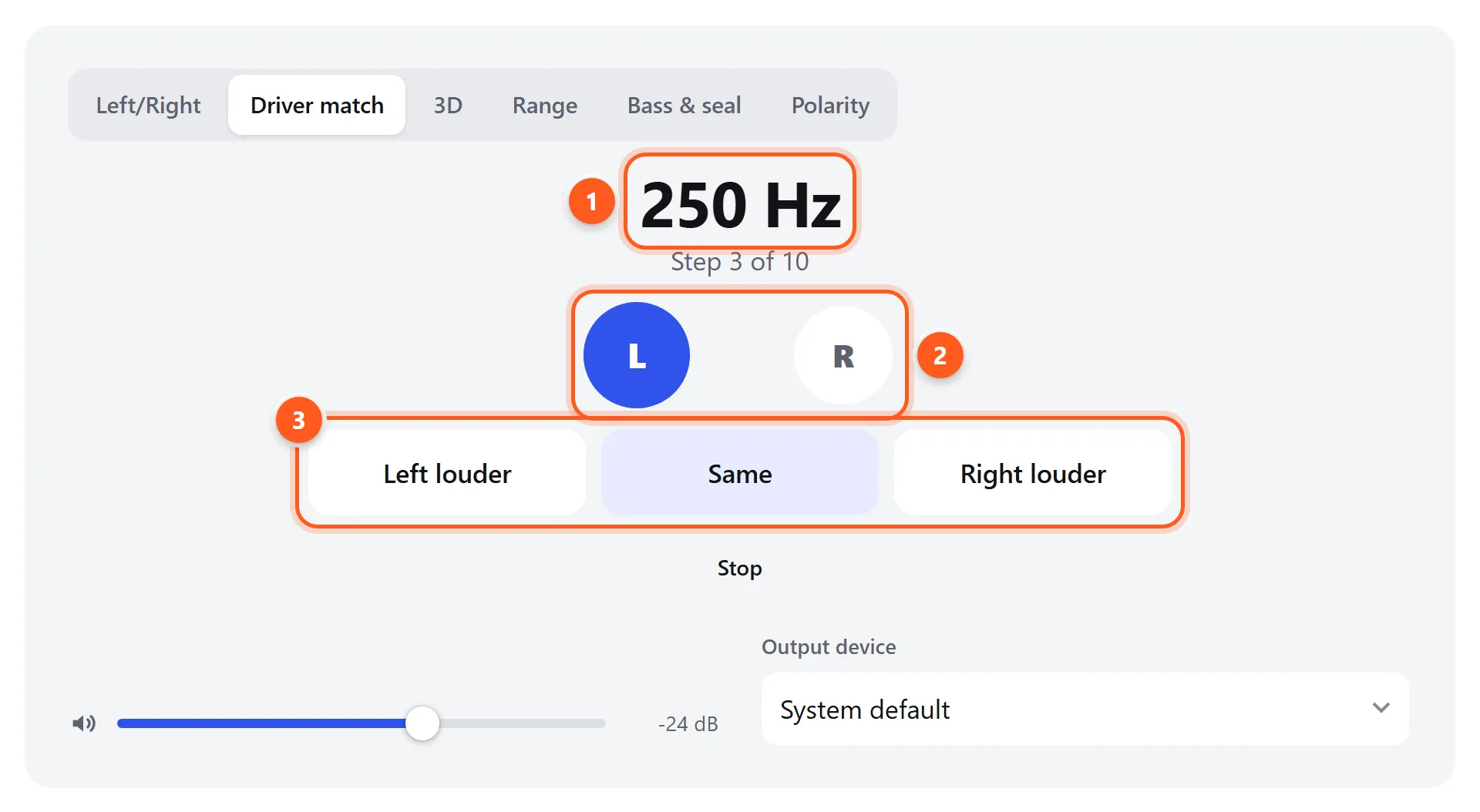
- The frequency being compared, and your progress through the 10 steps.
- The ear that’s currently playing lights up. The tone alternates left, right, left…
- Pick the side that sounds louder, or Same. The test moves to the next frequency.
What each test tells you
| Test | What it checks | Good result |
|---|---|---|
| Left/Right | Channel order and wiring | Each word only in its own ear |
| Driver match | Whether both drivers have the same loudness at each frequency | “Same” at all or nearly all steps |
| 3D | Stereo imaging and virtual surround | A clear movement from left to right; front/back is a bonus |
| Range | Bass extension and treble extension | Bass audible from about 20–30 Hz; treble up to your hearing limit |
| Bass & seal | Fit of earbuds and on-ear pads | Pressing the earbuds in barely changes the bass |
| Polarity | Whether one driver is wired backwards | A focused, B diffuse |
The 3D sound test
The 3D tab uses binaural rendering: the browser filters the sound the way your head and outer ears would if it came from a real direction. Use it to check that both drivers work together. A sound that jumps sideways or stays stuck on one side points to a channel or balance problem. Short bursts of noise are used because sharp, broadband sounds are the easiest for your brain to locate.
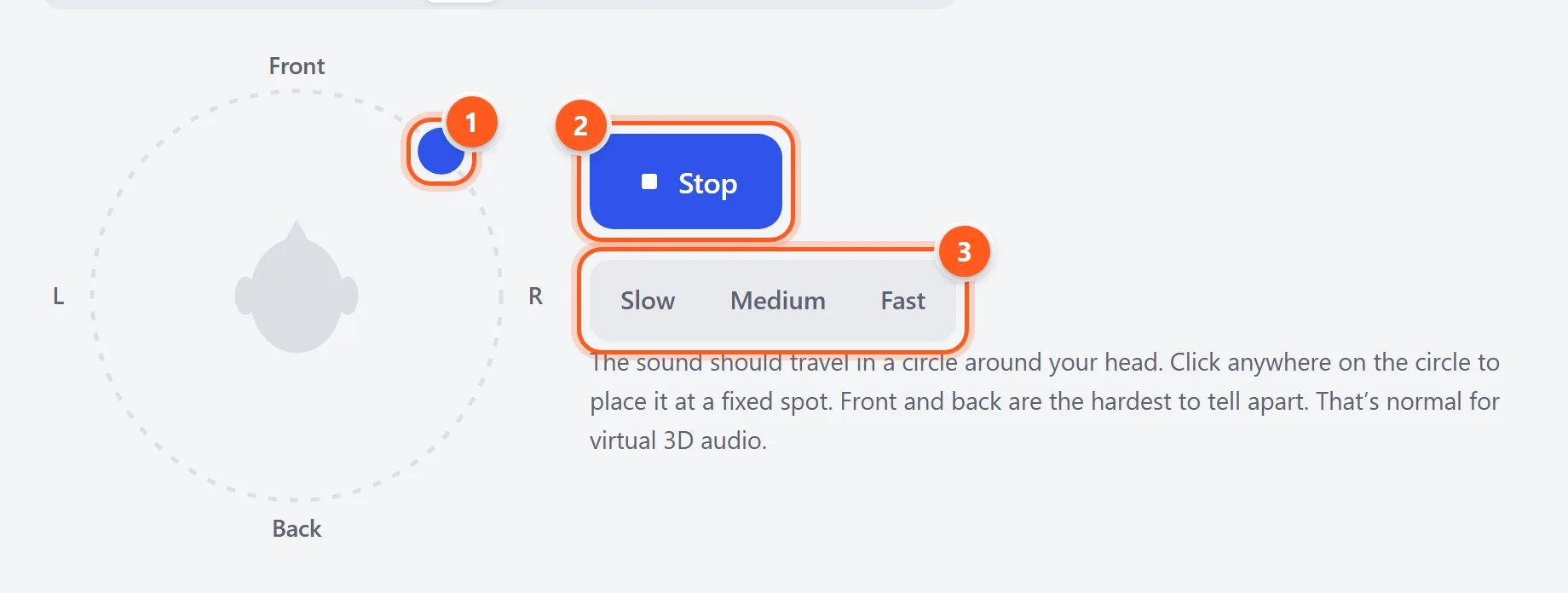
- The blue dot shows where the sound should be. Click anywhere on the circle to place it there.
- Start or stop the 3D sound.
- How fast the sound circles your head.
Wired vs. Bluetooth headphones
Frequency limits of Bluetooth codecs
Wired headphones play whatever your device sends. Bluetooth headphones receive compressed audio, and the codec affects the top end of the treble sweep:
| Codec | Common on | Typical high-frequency limit |
|---|---|---|
| SBC | Every Bluetooth device (the default) | Often filtered around 14–17 kHz at normal bitrates |
| AAC | iPhone, AirPods, many Android phones | Usually around 16–19 kHz, depending on the encoder |
| aptX / aptX HD | Android, Windows, Qualcomm-based headphones | Up to about 20 kHz |
| LDAC | Sony headphones, many Android phones | Up to 20 kHz and beyond at 660–990 kbps |
Most adults can’t hear above 15–17 kHz anyway. Hear the difference yourself: . If one of these is silent over Bluetooth but audible on wired headphones, the codec is the cause.
Hands-free mode ruins the sound
When a calling or gaming app uses your Bluetooth headset’s microphone, classic Bluetooth switches to the hands-free profile. Audio turns mono and muffled, as if you were on a phone call. To keep high-quality stereo:
- Windows: in the app’s audio settings, set the output to “Headphones (your headset) Stereo” and choose another microphone. In Settings → Bluetooth & devices → Devices → More devices and printer settings, you can turn off Hands-free Telephony in the headset’s Services tab if you never use its mic.
- macOS: choose the built-in microphone in System Settings → Sound → Input while using AirPods or other Bluetooth headphones for output.
- Newer headphones with Bluetooth LE Audio (LC3 codec) can use the mic without such a big drop in quality.
Fixing one side that’s quiet or silent
- Wired: push the plug fully into the jack and rotate it while “Left” and “Right” play. Crackling or cutting out means a worn cable or jack. If you use an adapter or extension, test without it.
- Earbuds: clean the mesh, and try the next size of ear tip. A loose fit in one ear makes that side sound thinner and quieter.
- True wireless earbuds: put both earbuds in the case, close the lid for 15 seconds, and try again. If one earbud still won’t play, reset the pair (for AirPods: hold the case button for about 15 seconds until the light flashes amber, then white) and pair again.
- Balance: Windows: Settings → System → Sound → your headphones → Left/Right volume. macOS: System Settings → Sound → Output → Balance. iPhone: Settings → Accessibility → Audio & Visual → Balance. Android: Settings → Accessibility → Audio adjustment.
- Hearing: if every pair of headphones seems quieter on the same side, the cause may be your ear rather than the headphones. Check with the hearing test.
Is headphone burn-in real?
Mostly not. Measurements of new and “burned-in” headphones show changes of a fraction of a decibel, usually in the bass and settled within the first hour. That’s far less than the difference from moving the headphones slightly on your head. What changes is your brain: after a week with a new pair, your hearing adapts to its tuning. There’s no harm in playing noise through new headphones, but it won’t fix a pair you don’t like.