How to use the DTMF generator
- Press keys on the keypad, or use your keyboard’s number keys plus * and #. The tone plays for as long as you hold the key, and the two frequencies are shown above the keypad. Multi-touch works, so you can press two keys at once to hear how a decoder handles it.
- Dial a sequence: the keys you press collect in the number field. You can also type or paste a number. Press Play number (or Enter) to play it with precise timing, and change Tone length and Gap for slow or fast dialing.
- Download the sequence as a WAV file to use in an IVR prompt, a test or a video.
- Call progress tones play the dial, ringback and busy tones used in the US and UK. Click again to stop.
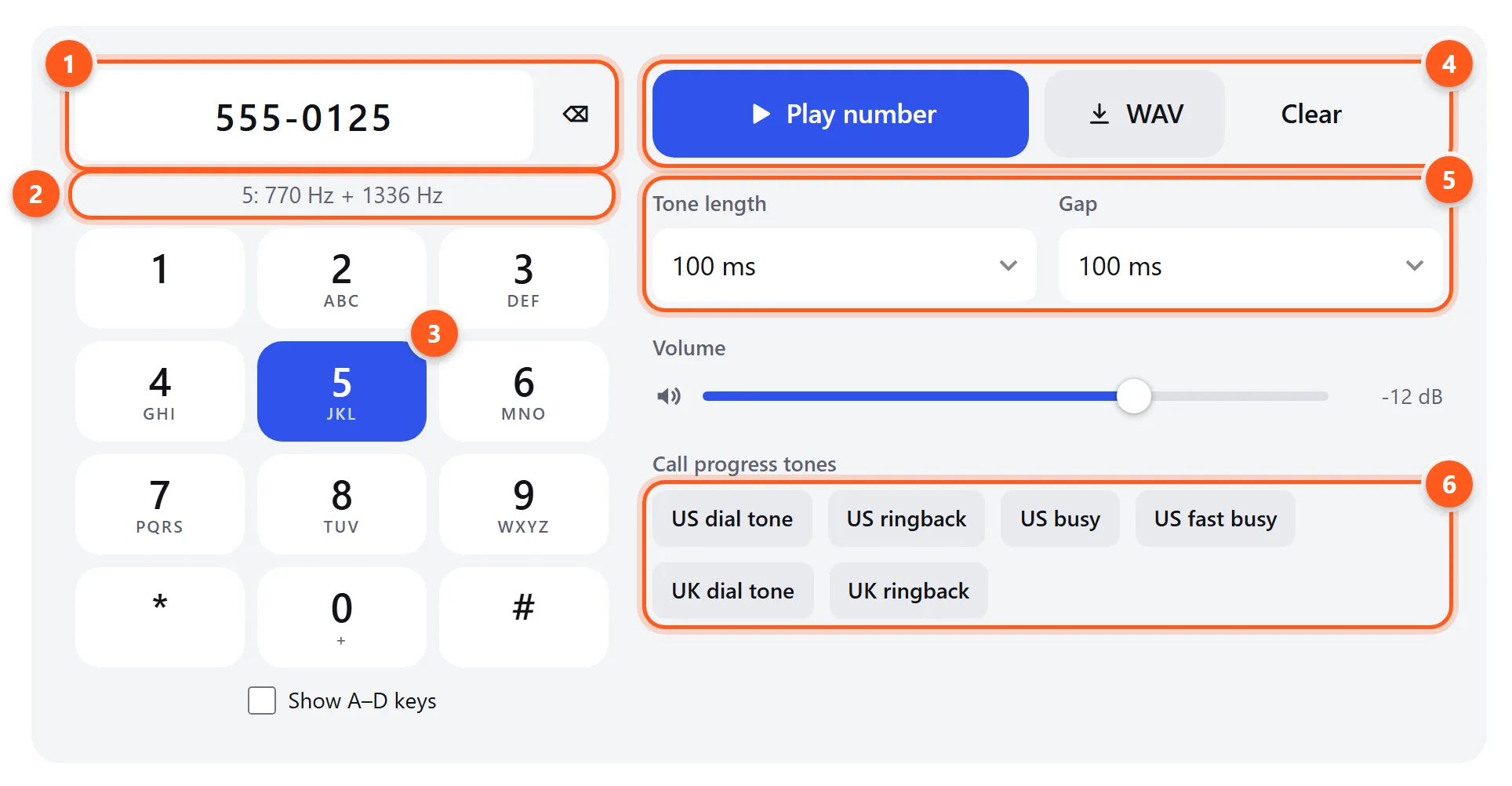
- The number you’re dialing. Pressed keys are added here, and you can type too.
- The two frequencies of the key you pressed.
- Hold a key to play its tone.
- Play the whole number, or download it as a WAV.
- Tone length and gap between digits.
- Dial tone, ringback and busy tones.
DTMF frequency table
Each key combines one row frequency and one column frequency. Click a key to hear it. The frequencies were chosen so that no frequency is a harmonic of another, which keeps speech and music from accidentally triggering them.
| 1209 Hz | 1336 Hz | 1477 Hz | 1633 Hz | |
|---|---|---|---|---|
| 697 Hz | ||||
| 770 Hz | ||||
| 852 Hz | ||||
| 941 Hz |
Hear the two groups separately: the low (row) tones and the high (column) tones .
How DTMF decoding works
A decoder has to answer two questions about every few milliseconds of audio: is a DTMF tone present, and which one? The decoder on this page does what telephone exchanges do:
- Measure the eight frequencies. The Goertzel algorithm is a cheap way to measure the energy at a handful of specific frequencies. It’s like an FFT that only computes the bins you care about. The decoder analyzes a 40 ms window of audio every 10 ms.
- Pick the strongest tone in each group and require it to be clearly stronger (about 8 dB or more) than the others in its group.
- Check that the two tones dominate. Together they must carry most of the signal’s energy, which rejects speech, music and noise that happen to contain those frequencies.
- Check the “twist”, the level difference between the high and low tone. Real lines attenuate high frequencies, so some difference is normal, but more than about 8 dB isn’t a valid tone.
- Require a minimum duration (two consecutive windows) and a release between repeats, so a long press counts once and 5-5-5 counts three times.
The decoder rejects frequencies more than about 3.5% off, as the standard requires, and accepts tones from about 40 ms long at standard telephone quality (8 kHz) or better.
Call progress tones
| Tone | Frequencies | Pattern |
|---|---|---|
| US dial tone | 350 + 440 Hz | Continuous |
| US ringback | 440 + 480 Hz | 2 s on, 4 s off |
| US busy | 480 + 620 Hz | 0.5 s on, 0.5 s off |
| US fast busy (reorder) | 480 + 620 Hz | 0.25 s on, 0.25 s off |
| UK dial tone | 350 + 450 Hz | Continuous |
| UK ringback | 400 + 450 Hz | 0.4 s on, 0.2 s off, 0.4 s on, 2 s off |
These are the North American “Precise Tone Plan” and the UK (BT) standards. Other countries use different tones. Much of Europe, for example, uses a single 425 Hz tone, which you can play with the tone generator.
What DTMF is used for
- Testing phone menus (IVR): download a WAV of a menu path, such as
1,,2,,#with pauses, and play it into a call to step through the menu the same way every time. - Amateur radio: repeaters and linking systems (EchoLink, AllStar) are controlled with DTMF codes, often including the A–D keys.
- Retro phones and electronics: check that an old Touch-Tone phone or a DTMF decoder chip (such as the MT8870) is working, or generate tones for Arduino projects.
- Forensics and curiosity: decode the number dialed in a recording or video. If the dialing tones are audible, the decoder will usually recover the digits.
- Sound design: authentic phone keypad sounds for film, games and podcasts.