How to use the tone generator
- Set your volume low first. Pure tones can sound surprisingly loud, especially between 2 and 5 kHz, where hearing is most sensitive.
- Choose a frequency. Type it into the big number, for example
440,1k,2.5khz, or a note name likeA4orC#5, then press Enter. You can also drag the slider. It’s logarithmic, so each octave takes up the same width. - Press Play (or Space). Change the frequency while it plays and the pitch glides smoothly, without clicks.
- Fine-tune. Use the buttons to step by 1 Hz, by a semitone, or by an octave (×½ and ×2). With the keyboard, ←/→ nudge by a quarter semitone, adding Shift steps by 1 Hz, and Ctrl steps by 0.01 Hz.
- Pick a waveform and balance. Send the tone to the left or right channel only with L and R, or anywhere in between with the slider.
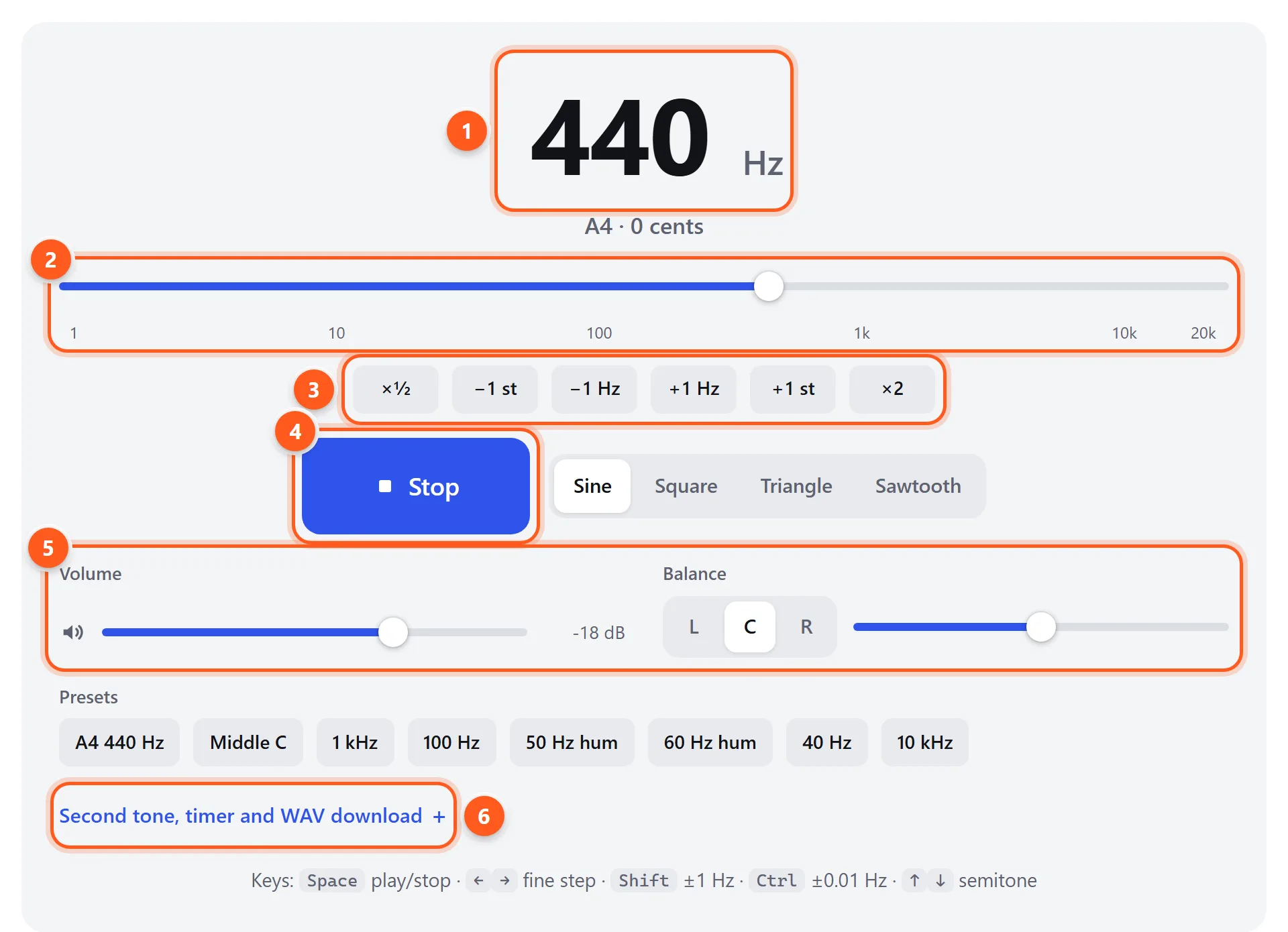
- Type a frequency or note name. The nearest musical note and how far off it is (in cents) appear below.
- Logarithmic slider from 1 Hz to 22 kHz.
- Step by an octave, a semitone or 1 Hz.
- Play or stop (Space). Choose the waveform alongside.
- Volume and left/right balance.
- Second tone, auto-stop timer and WAV download.
Everything you set is saved in the page address, so you can bookmark a tone or send it to someone. The Second tone, timer and WAV download section lets you layer two tones (to hear beats or play a dial-tone-style chord), stop automatically after a set time, or save the tone as a WAV file to use offline.
Waveforms: what they sound like
| Waveform | Sound | Harmonics | Good for |
|---|---|---|---|
| Pure, smooth, flute-like | None, just the fundamental | Hearing tests, speaker checks, finding resonances, tuning | |
| Soft and mellow, slightly hollow | Odd harmonics, falling off fast | A gentler reference tone that’s easier to hear on small speakers | |
| Buzzy and hollow, like an old video game | Odd harmonics (3rd, 5th, 7th…) at 1/n strength | Retro sounds, checking for rattles across many frequencies at once | |
| Bright and brassy, like a synth lead | All harmonics at 1/n strength | Synth demos, making low frequencies audible on small speakers |
A useful trick: if your speakers can’t reproduce a low sine tone, switch to sawtooth. You’ll “hear” the pitch through its harmonics even though the fundamental itself isn’t being played. That’s also why a bass line is audible on a phone speaker.
Musical note frequencies
Frequencies in standard tuning (A4 = 440 Hz). Each octave up doubles the frequency, and each semitone multiplies it by about 1.0595. Click a note in the octave 4 column to hear it.
| Note | Octave 2 | Octave 3 | Octave 4 | Octave 5 | Octave 6 |
|---|---|---|---|---|---|
| C | 65.41 | 130.81 | 523.25 | 1046.5 | |
| C♯ | 69.30 | 138.59 | 554.37 | 1108.7 | |
| D | 73.42 | 146.83 | 587.33 | 1174.7 | |
| D♯ | 77.78 | 155.56 | 622.25 | 1244.5 | |
| E | 82.41 | 164.81 | 659.26 | 1318.5 | |
| F | 87.31 | 174.61 | 698.46 | 1396.9 | |
| F♯ | 92.50 | 185.00 | 739.99 | 1480.0 | |
| G | 98.00 | 196.00 | 783.99 | 1568.0 | |
| G♯ | 103.83 | 207.65 | 830.61 | 1661.2 | |
| A | 110.00 | 220.00 | 880.00 | 1760.0 | |
| A♯ | 116.54 | 233.08 | 932.33 | 1864.7 | |
| B | 123.47 | 246.94 | 987.77 | 1975.5 |
Some musicians prefer A4 = 432 Hz. To get any note in that tuning, multiply its frequency above by 432/440 (0.9818). For example, middle C (C4) becomes 256.87 Hz.
What you can do with a tone generator
Test speakers and headphones
Step through frequencies to find where your speakers stop producing sound, or where something buzzes. Rattles usually show up between 30 and 150 Hz. A sine tone makes the buzzing part of the speaker or room obvious because nothing else is playing. For a guided version, use the frequency test (an automatic sweep) or the bass test. To check left and right separately, set the balance to L or R.
Match your tinnitus frequency
Many people with tonal tinnitus use a tone generator to find the pitch of their ringing. Start around 4 kHz at a low volume, then move up or down by semitones until the tone sounds closest to what you hear. Then fine-tune with ±1 Hz. Note that frequency, along with whether it’s in one or both ears, because it’s useful information for an audiologist. Keep the volume just audible. Never mask tinnitus with loud tones.
Hear beats and binaural beats
Open Second tone and set it a few hertz away from the first, for example 440 and 444 Hz. Played together, they pulse 4 times a second. That’s acoustic beating, the same effect you use to tune a guitar. Tick Tone 1 in the left ear, tone 2 in the right and listen on headphones to get a binaural beat instead. Your brain creates the pulse, because neither ear receives it directly.
Tune instruments and practice pitch
Type a note name to play a reference pitch. For ear training, play a note, sing it back, then check yourself with the perfect pitch test.
Physics and science demonstrations
Classic classroom demonstrations use a tone generator: standing waves in a tube, Chladni patterns on a plate driven by a speaker, resonance in wine glasses, and finding the upper limit of hearing across a class (younger students usually hear higher). The sliding pitch also makes the Doppler effect and the logarithmic nature of pitch easy to show.
Hum and mains frequencies
The 50 Hz and 60 Hz presets reproduce electrical mains hum (50 Hz in Europe, Asia, Africa and Australia; 60 Hz in North America and parts of South America and Asia). If a recording or amplifier hums, comparing it with these tones tells you whether the hum is from the mains, which points to a ground loop.
Safety
Protect your ears and speakers. Start with your system volume low and raise it slowly. Continuous tones are more fatiguing than music. Take breaks, and don’t use headphones at a level that feels loud. Very high or very low frequencies at high volume can damage tweeters and woofers even when you can’t hear them. If you can’t hear a tone, don’t turn the volume up to compensate.