How to use the noise generator
- Click a color to start it playing. Click another color to crossfade smoothly to it.
- Set the volume with the slider. Your device’s volume still applies, so for sleep, turn the device down and use the slider for fine control.
- Choose stereo or mono. Stereo sounds wider. Mono focuses the sound in the center, which is useful for speaker testing.
- Optional: set a sleep timer: pick a preset or choose Custom and type any length, like 45 (minutes) or 1:30 (hours:minutes). The noise fades out gently over the last minute instead of cutting off abruptly.
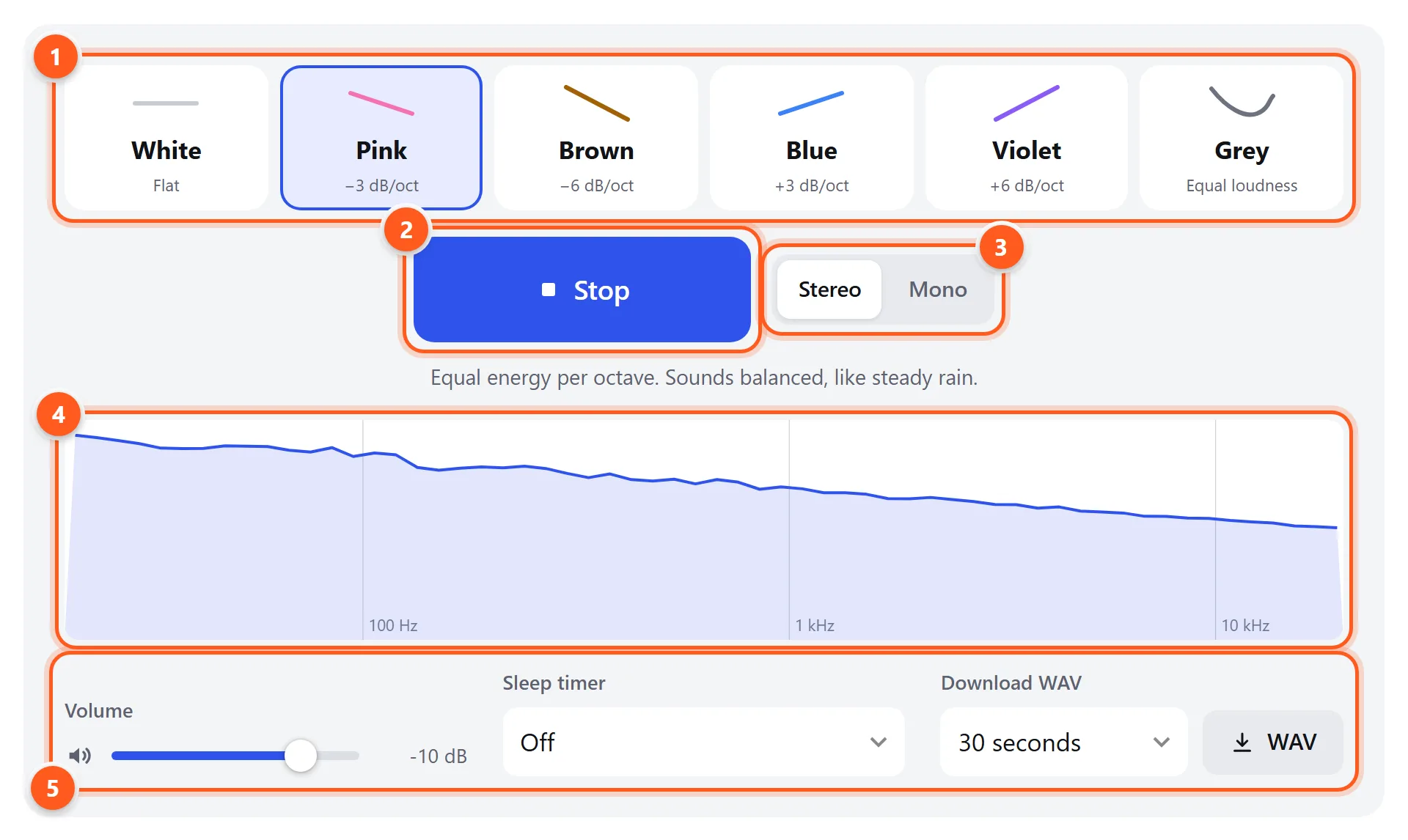
- Noise colors. The small line shows how each one’s energy changes from low to high frequencies.
- Play or stop (or press Space).
- Stereo (different noise in each ear) or mono (identical).
- The live spectrum shows the shape of the current noise, low frequencies on the left.
- Sleep timer with a gentle fade-out, and WAV download.
Noise colors explained
A noise’s “color” describes how its energy is distributed across frequencies. The names borrow loosely from light: white light contains all colors equally, pink and brown lean toward the low (red) end, and blue and violet lean toward the high end.
| Color | Spectrum | Sounds like | Common uses |
|---|---|---|---|
| Flat | TV static, a hissing radiator | Masking speech, audio and electronics testing | |
| −3 dB/octave | Steady rain, wind in trees | Speaker calibration, sleep, focus | |
| −6 dB/octave | Waterfall, ocean surf, airplane cabin | Sleep, masking low rumble, focus | |
| +3 dB/octave | Hissy spray, sharper than white | Audio dithering, tinnitus therapy research | |
| +6 dB/octave | Very thin, high-pitched hiss | High-frequency tinnitus masking, tweeter checks | |
| Inverse equal-loudness | Even and “flat” to the ear | Hearing research, perceptually balanced masking |
White noise
White noise has the same energy at every frequency, so a spectrum analyzer shows a flat line. Because each octave contains twice as many frequencies as the one below it, most of white noise’s energy is in the treble, and that’s why it sounds bright and hissy. It’s the best signal for testing electronics and measuring frequency response, and it masks speech well in open offices. Many people find it too harsh for sleep.
Pink noise
Pink noise falls by 3 dB per octave, so every octave (20–40 Hz, 40–80 Hz, … 10–20 kHz) carries the same energy. That matches how we perceive pitch, so pink noise sounds balanced, like steady rainfall. It’s the standard signal for calibrating speakers and rooms, because its spectrum resembles music. Sleep studies have used it too: some found that pink noise timed to deep sleep improved memory consolidation.
Brown noise
Brown noise (also called red or Brownian noise, after the random motion it’s based on) drops 6 dB per octave. The bass dominates, so it sounds deep and soft, like a waterfall heard from a distance or the inside of an airplane. It’s popular for sleep and for focusing because it has almost no hiss, and it masks low-frequency sounds like traffic and footsteps better than white noise.
Blue noise
Blue noise rises 3 dB per octave, the mirror image of pink. It sounds sharper and thinner than white noise. Its main technical use is in dithering, both for audio and images: noise shaped toward high frequencies is less noticeable. It’s rarely used for relaxation.
Violet (purple) noise
Violet noise, sometimes called purple noise, rises 6 dB per octave, the mirror image of brown. It’s almost entirely high-frequency hiss. Some people with high-pitched tinnitus find it a useful masker because it covers the same frequency region as their ringing. It’s also a quick way to check whether a tweeter is working.
Grey noise
Grey noise is shaped to sound equally loud at all frequencies to human ears. Our hearing is most sensitive around 2–5 kHz and much less sensitive to bass, so grey noise boosts the lows and highs and dips in the middle. Here it’s based on the inverse of the standard A-weighting curve. It’s used in psychoacoustic research and in some tinnitus sound therapy.
Using pink noise to level-match speakers
If one speaker sounds louder than the other, or your center or surround speakers seem too quiet, pink noise and a sound level meter will fix it in minutes:
- Set the noise generator to pink and mono.
- Sit in your usual listening position and point a sound level meter (or a phone running the decibel meter) at the ceiling, at ear height.
- Play the noise through one speaker at a time. On a stereo setup, disconnect one speaker or use the balance control. On a surround receiver, use its built-in test-noise mode, which works the same way.
- Adjust each speaker’s level until all read the same, typically 75 dB with C-weighting for home theater.
Exact calibration files (pink noise at −20 dBFS, the level used by most calibration standards) are on the test tones page.
Noise for sleep and focus
- Keep it quiet. Aim for the level of a soft shower: you should be able to talk over it easily. For babies, keep it below about 50 dB (the hospital nursery limit) and place the speaker well away from the crib, at least 2 meters (about 7 feet), as researchers recommend.
- Prefer speakers to earbuds overnight, and if you use headphones, keep the volume well below half.
- Use the timer. Many people only need noise to fall asleep. The fade-out avoids waking you with a sudden silence.
- Experiment with color. Brown masks rumble, pink masks voices and household sounds, and white masks high-pitched sounds best.
Tinnitus: sound therapy works best with a level just below your tinnitus, so it blends in rather than covering it completely. Try the color whose pitch is closest to your ringing (violet or blue for high-pitched tinnitus). If you have new or one-sided tinnitus, see a doctor or audiologist.
Downloading noise files
The Download WAV button saves the current color and channel mode as a 48 kHz, 16-bit WAV file of 30 seconds, 60 seconds or 5 minutes. The files are built to loop perfectly, so set any music player to repeat for endless noise without a gap. They’re free to use for any purpose, including commercial projects.